7 Checks for a Customer Self-Service Portal Launch
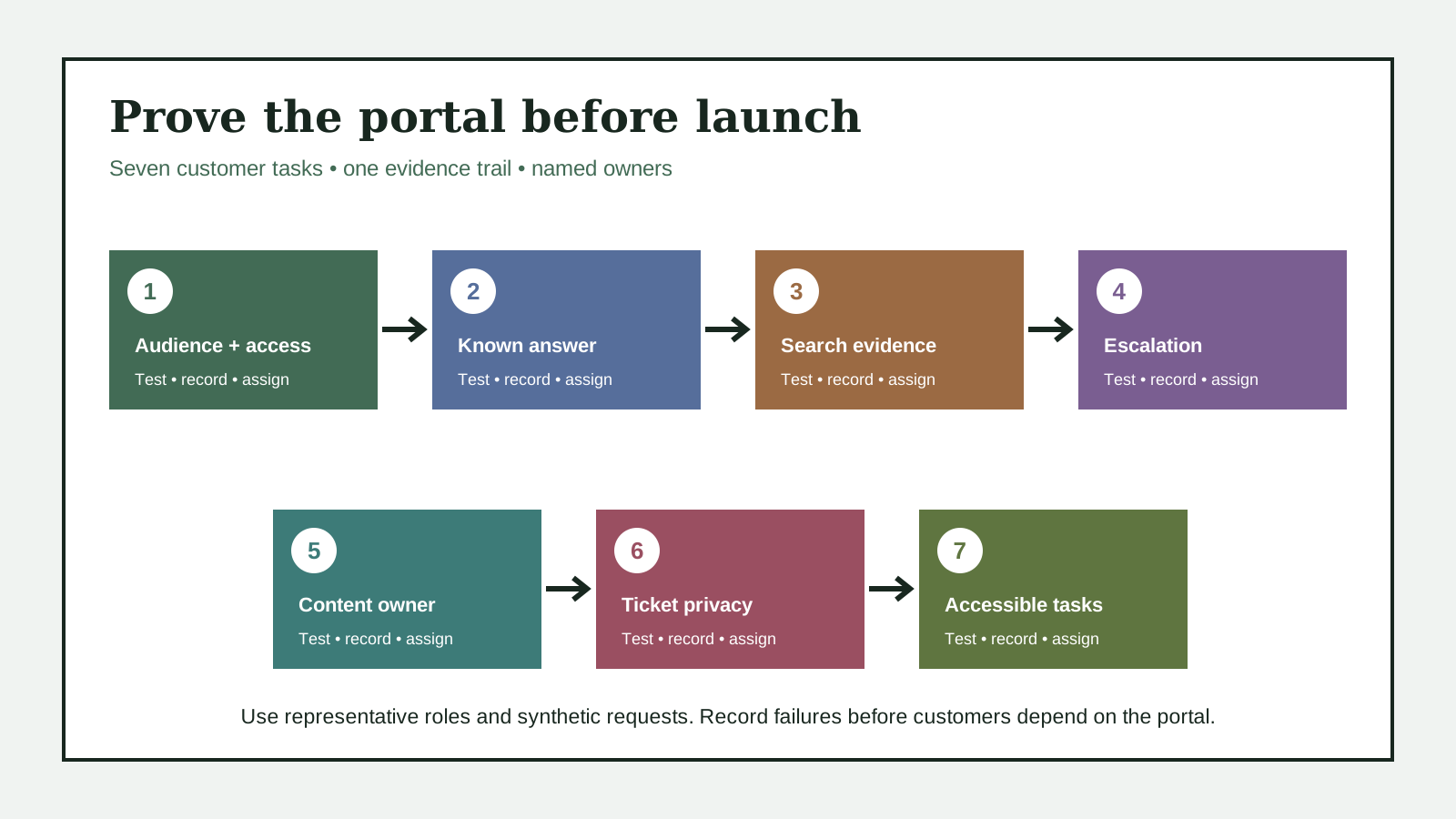
Use seven launch checks to verify portal access, answer findability, search evidence, escalation, content ownership, ticket privacy, and accessible task completion.
The short answer
Test the portal as representative customers, not only as an administrator. Verify audience and sign-in rules, known-answer findability, failed-search evidence, escalation and request tracking, article ownership, account-data visibility, and mobile and assistive-technology task completion. Record the exact account role, route, query, device, result, and owner for every failed check before launch.
A portal is not ready because its homepage loads for an administrator. Customers may face different sign-in rules, search results, article permissions, request forms, and ticket views. Launch evidence must follow the customer’s real tasks from entry to answer or escalation.
Official Zendesk and Intercom documentation separates knowledge search, customer request tracking, access rules, search reporting, content verification, and ticket visibility. W3C guidance adds labels, error recovery, status messages, headings, and page regions. These sources support a shared launch test, not a claim that every portal uses the same controls.12345678
Choose a small set of representative customer roles and tasks. Use synthetic or approved test requests. Record the account role, device, route, query, expected result, observed result, and next owner. Do not copy unrelated customer data into launch notes.
1. Can each intended customer enter the right portal?
Test public, signed-in, and restricted paths with representative accounts before measuring anything else.
List the audiences the portal is meant to serve. For each one, record whether articles are public, whether request submission needs sign-in, and whether ticket history needs a verified account. Include registration, sign-in, sign-out, and account recovery when those paths exist.
Zendesk documents open, closed, and restricted end-user access, with different registration and request-submission behavior. Those labels are product-specific, but they show why an administrator’s successful session cannot prove customer access.2
Run each test in a fresh browser session with the intended role. Confirm the user reaches the correct portal and sees a useful explanation when access is denied. Save no password, session token, or unrelated profile data in the evidence.
- When it helps
- When the portal serves public visitors, registered customers, partner accounts, or more than one brand.
- What to watch
- Representative account testing takes setup time, but it prevents an access rule from hiding support from the audience it was meant to serve.
2. Can customers find a known answer in more than one way?
Test navigation, search, and a direct article route with the words customers actually use.
Pick three common support questions with approved answers. Start from the portal homepage on desktop and mobile. Try the navigation label, a plain-language search, a likely misspelling, and the direct article URL. Record how many choices and dead ends appear.
Zendesk describes a help center as a knowledge base plus request and community paths. W3C says meaningful headings and page regions help keyboard, screen-reader, cognitive, and mobile users navigate and orient themselves.18
A passing result opens the intended answer without requiring the customer to know an internal product term. If search and navigation disagree, record the query and route. The separate search-gap and navigation articles can analyze the deeper pattern later.
- When it helps
- When the content is present but customers may use different words, devices, or entry routes.
- What to watch
- A small task sample cannot prove every article is findable, but it catches broken labels, dead routes, and obvious vocabulary gaps before launch.
3. Does a failed search produce measurable evidence?
Confirm that zero-result and weak-result searches become usable content signals instead of silent exits.
Search for one known answer, one common synonym, and one intentionally missing answer. Record the result count, article click, next action, and whether the query appears in the reporting view after the documented refresh interval.
Zendesk says its search dashboard can show search terms, results, clicks, and subsequent actions. Intercom’s Articles report describes search volume and click-through views for keywords. Product formulas and availability differ, so use the portal’s own current definitions.34
Assign every high-value zero-result query to an owner and action: create content, add a synonym, repair permissions, or explain that the task needs support. Do not call a search successful merely because it returned any article.
- When it helps
- When launch success includes ticket reduction, answer discovery, or a content-improvement loop.
- What to watch
- Search telemetry adds operational work and may be delayed, but without it the team cannot distinguish missing content from weak findability.
4. Can a customer escalate without losing context?
Follow the route from an article or failed search to request confirmation and later status tracking.
From a help article and from a failed search, locate the support route. Submit a synthetic request with the minimum required fields. Confirm a clear success message, reference, or email, then sign in as the same role and find the request status.
Zendesk describes a help center that lets end users submit requests and manage them in a customer portal when they cannot find an answer. Available forms and tracking behavior depend on configuration and plan.1
Record whether the original article or search term survives into the request. Give urgent, sensitive, safety-critical, and out-of-scope issues a direct human route. Self-service should not trap a customer in a repeated search loop.
- When it helps
- When the portal is expected to hand unresolved questions to a support team and let customers follow progress.
- What to watch
- A complete escalation test crosses several systems, but it catches silent form failures and missing request history before customers depend on them.
5. Does every launch answer have an owner and review date?
Bind each launch-critical article to a responsible owner, publishing permission, source, and next verification point.
For each article used in the launch tasks, record the content owner, approver, published source, factual dependencies, and next review date. Confirm that the owner can edit or route a correction and that an absent owner has a documented replacement.
Zendesk’s article verification workflow links accuracy and currency to owners, publishers, and knowledge administrators with permission to verify. Other products use different roles, but the operational need is the same: a visible answer needs a responsible maintainer.5
Open the exact live article and compare its key steps with the reviewed source. A populated owner field is not proof that review occurred. Keep the evidence date and the material source that was checked.
- When it helps
- When answers depend on product settings, policy, eligibility, schedules, or other facts that can change.
- What to watch
- Ownership and review dates create recurring work, but they prevent a launch library from becoming an unmaintained archive.
6. Do account and ticket views expose only permitted data?
Test own-ticket and shared-company visibility with representative roles, copied URLs, and signed-out behavior.
Create synthetic requests for two representative users and, when relevant, two companies. Test each account’s list, search, filters, ticket detail, attachment links, and copied ticket URLs. Sign out and repeat the direct-link test.
Intercom documents separate portal access rules and ticket-visibility conditions. Depending on configuration, a customer may see company tickets or only tickets they created. That product example shows why access to the portal and access to each record must be tested separately.6
Record only synthetic IDs and the role-to-result matrix. Stop the launch if a user can open another customer’s request, attachment, message, or account detail. Do not probe production records that the test account is not authorized to view.
- When it helps
- When portals expose tickets, messages, attachments, organization activity, billing details, or profile data.
- What to watch
- Role testing requires carefully prepared accounts, but it addresses a higher-risk failure than a cosmetic portal defect.
7. Can people complete key tasks on mobile and with assistive technology?
Check the real search, sign-in, and request flows for structure, keyboard use, labels, errors, and status messages.
Run the launch tasks at a narrow mobile width and by keyboard. Check visible focus, logical order, headings, landmarks, form labels, instructions, validation, error recovery, and completion messages. Include a screen-reader pass when that is part of the team’s approved test method.
W3C guidance calls for labels, instructions, understandable validation, error correction, and notifications in forms. Its page-structure guidance explains how headings and regions support keyboard, screen-reader, cognitive, and mobile navigation.78
Record the exact task, browser, viewport, input method, assistive technology when used, and observed result. A visual spot check is not an accessibility conformance claim. Escalate material blockers to the frontend and accessibility owners before launch.
- When it helps
- For every portal that customers must search, sign into, or use to submit and track requests.
- What to watch
- Task-based accessibility testing takes specialist time, but it catches failures that screenshots and automated scans cannot establish.
Putting it into practice
Fictional launch table: a signed-out visitor can open public articles, but a registered customer receives a loop after sign-in. The portal is not ready. The evidence names the role, browser, route, time, and identity owner without recording credentials.
A second test finds the setup article by direct link but not by the customer’s common phrase. The phrase appears as a zero-result query, and the article owner accepts a synonym update. A synthetic request then submits, confirms, and appears only for the expected account.
The final mobile keyboard pass reaches search, result, request form, validation error, confirmation, and ticket status in a logical order. Seven checks turn “the portal is live” into an evidence-based launch decision with named owners for every remaining gap.
How this guide was researched
Drafted from the approved S095-L01 research record and eight current official Zendesk, Intercom, and W3C pages opened on 30 October 2026. Material product and accessibility claims carry source IDs; the launch evidence table and seven-check route are original editorial guidance. No customer portal, account, ticket, search log, private record, subscription, or product environment was accessed. Current Ahrefs requests were rejected because the connected account had zero available API units; the stored 22 October values remain dated evidence only. Factual, editorial, responsive visual, accessibility, publisher-practice, legal, deployment, live, crawler, rollback, and publication review remain pending.
A seven-check customer self-service portal launch route that binds access, findability, search evidence, escalation, content ownership, ticket visibility, and accessible task completion.
Editorial standardsSources
- Getting started with your help center
Checked 30 October 2026 · Zendesk describes help-center knowledge, community, request submission, and customer request-management functions.
- Understanding options for end-user access and sign-in
Checked 30 October 2026 · Zendesk documents open, closed, and restricted end-user access and related registration and request behavior.
- Analyzing help center search results
Checked 30 October 2026 · Zendesk documents search reporting for terms, results, clicks, next actions, and knowledge gaps.
- Articles report
Checked 30 October 2026 · Intercom documents search-term reporting, result performance, and click-through measures.
- Verifying articles that need review
Checked 30 October 2026 · Zendesk documents article verification by owners, publishers, and knowledge administrators.
- Customer portal setup
Checked 30 October 2026 · Intercom documents portal audience rules and own-ticket versus company-ticket visibility controls.
- Forms Tutorial
Checked 30 October 2026 · W3C provides accessible form guidance for labels, instructions, validation, error recovery, and notifications.
- Page Structure Tutorial
Checked 30 October 2026 · W3C explains semantic headings and page regions for navigation and orientation.